3% of every QuizLok subscription goes to Planet Water Foundation. 3% goes to Planet Water Foundation. Learn why
How It Works Features Pricing FAQ Join Waitlist
Launching June 2026 · Family early-access
Launching June 2026 · Early-access list

Earn Your
Screen Time

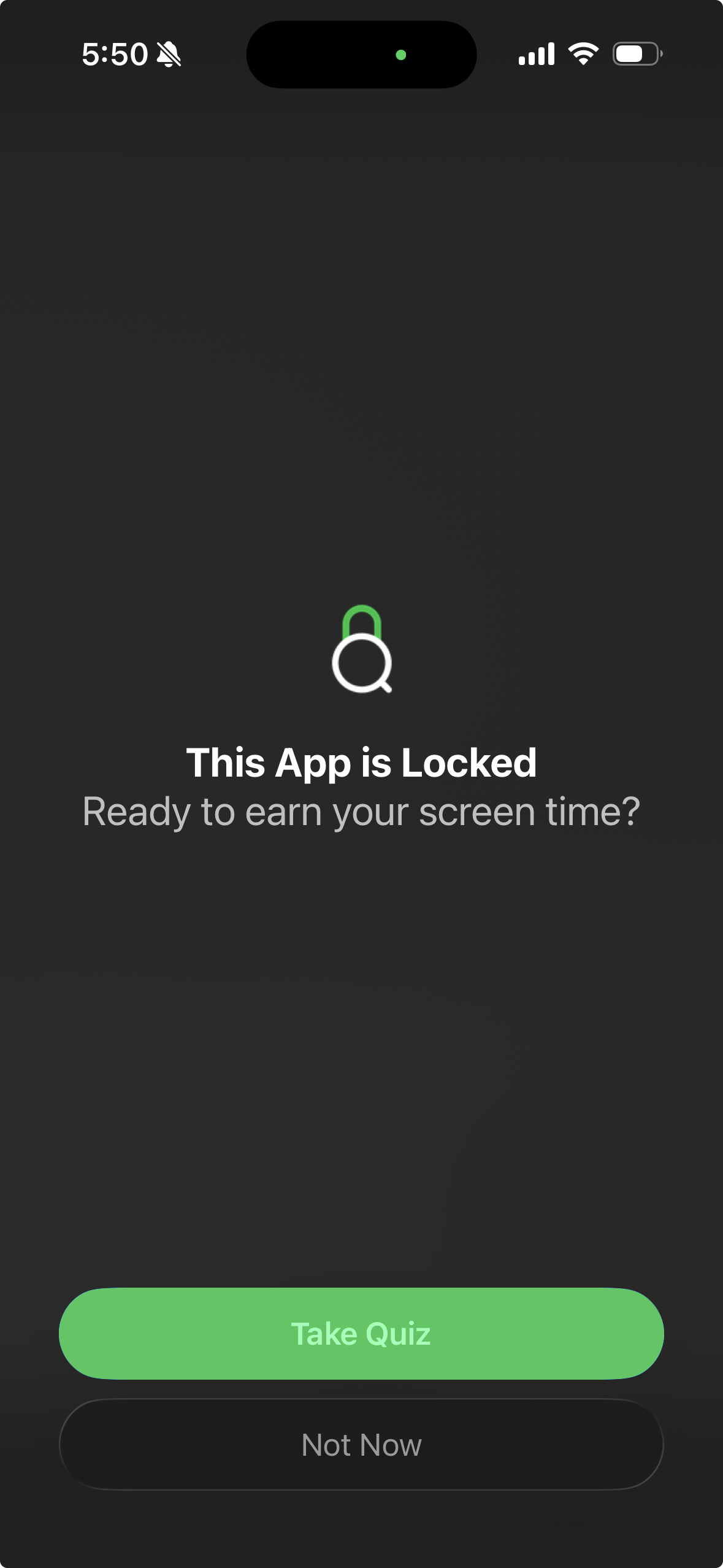
Most screen time apps just say no. QuizLok says earn it. Kids take a quick AI quiz before unlocking their favorite apps — turning screen time into learning time, automatically.

Doomscrolling at midnight? Studying for the ACT, PMP, bar, or MCAT? QuizLok adds a small tax to opening your distraction apps — paid in questions on whatever you're trying to learn. The phone you can't put down becomes the flashcard deck you can't escape.

Launching June 2026 · Waitlist members get discounted pricing locked in for life

Looking to lock down your own distractions instead of your kid's?

Setting this up for a kid?

Built for families who know willpower isn't the answer

QuizLok works for every kind of family — but these three especially.

🧠

ADHD Families

Telling a kid with an ADHD brain to "just put the phone down" doesn't work. QuizLok replaces willpower with a system — a small, automatic friction point that makes earning screen time the path of least resistance.

📚

Homeschool Families

Set topics that match your curriculum. Math, reading, history, science — QuizLok reinforces what you're already teaching and makes earning free time feel like a natural part of the school day.

😮‍💨

Tired of Being the Bad Guy?

QuizLok handles the enforcement so you don't have to. No arguments, no negotiations. The app re-locks automatically when time is up — no reminders needed from you.

Built for people who know willpower runs out

QuizLok works for anyone — but these three especially.

🎓

Cert & Exam Prep

ACT, SAT, MCAT, bar, PMP, AWS, CFA, USMLE — anything with a study guide. Add the topic, block the apps eating your study time, and turn every Instagram tap into a free flashcard. Spaced repetition forced by your own phone.

🧠

ADHD Adults

Built by an ADHD founder for the same reason. Willpower runs out by 2pm. A system doesn't. The quiz is a small friction point that breaks the tap-and-scroll reflex — sometimes you'll just close the app instead of taking the quiz, which is exactly the point.

Doomscrollers

Pick the language you've been "going to learn", the cert you've been "going to earn", or just spaced-rep flashcards on a topic you care about. Block TikTok, Instagram, Reddit. Now opening them costs you something — denominated in what you actually want to know.

How It Works

Three simple steps to smarter screen time

1
📚

Pick Topics

Choose any subject — math, science, history, or create custom topics. AI adapts to your child's grade level.

Whatever you're studying — ACT math, PMP exam, a language, college coursework. Type it in. AI calibrates to the level you set.

2
🔒

Block Apps

Choose which apps to lock for your child — games, social media, whatever's distracting. They stay blocked until a quiz is passed.

Pick the apps eating your time — Instagram, TikTok, Reddit, games. They stay blocked until you pass a quiz on what you're studying.

3
🧠

Take a Quiz

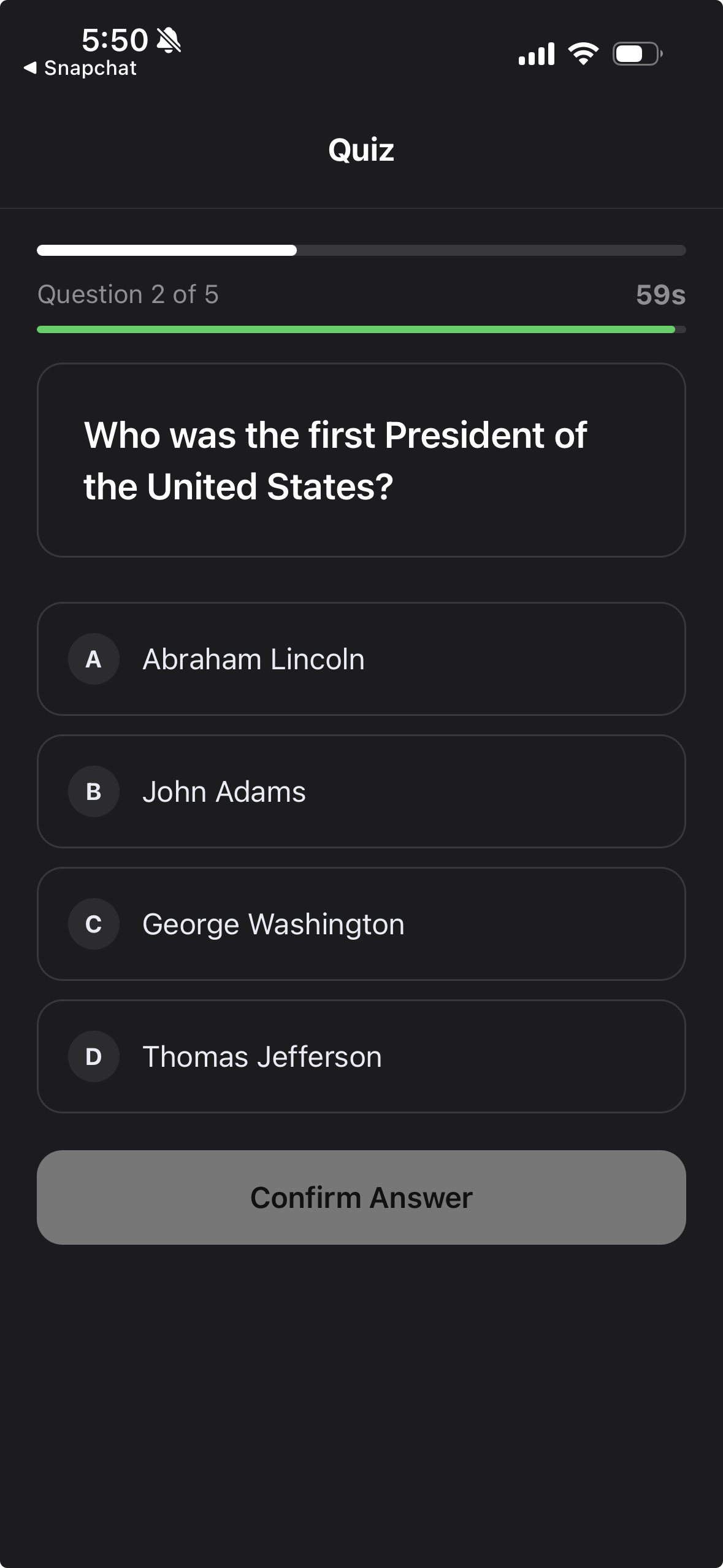
Fresh AI-generated questions every time. No memorizing answers. Real learning, real understanding.

4
🎮

Earn Screen Time

Pass the quiz and unlock your apps for the time your parent set. It's that simple.

Pass the quiz and your apps unlock for the time you set — 15 to 60 minutes. When time runs out, they re-lock automatically.

Everything parents need. Nothing kids can get around.

Built so future-you can't bargain with present-you.

🤖

AI-Generated Quizzes

Every quiz is unique and AI-generated fresh — kids can't memorize answers or look them up in advance. Topics range from 3rd grade math to high school history to whatever your family needs.

Every quiz is unique and AI-generated fresh — no memorizing the answer key. Add any topic: ACT math, USMLE Step 1, French vocab, AWS Solutions Architect. The model calibrates to the level you set.

🔒

App Blocking

Deep iOS integration means the block actually holds. Parents choose which apps require a quiz — games, social media, whatever's eating your kid's afternoon. The re-lock is automatic when time runs out, even if QuizLok is force-closed.

Deep iOS integration means the block actually holds. You pick the apps. The re-lock is automatic when your earned time runs out, even if you've force-closed QuizLok. No talking yourself into "just five more minutes."

🔐

Bypass-Proof Setup

QuizLok walks parents through a step-by-step device lockdown so kids can't delete the app, disable notifications, or work around the system. Follow the setup guide and it just works.

🚫

No Easy Off Switch

The whole point is friction you can't cheat past in a weak moment. Removing QuizLok needs the same setup steps you took to install it — five minutes of deliberate work, not one tap. By then the urge has usually passed.

👨‍👩‍👧‍👦

Parent Dashboard

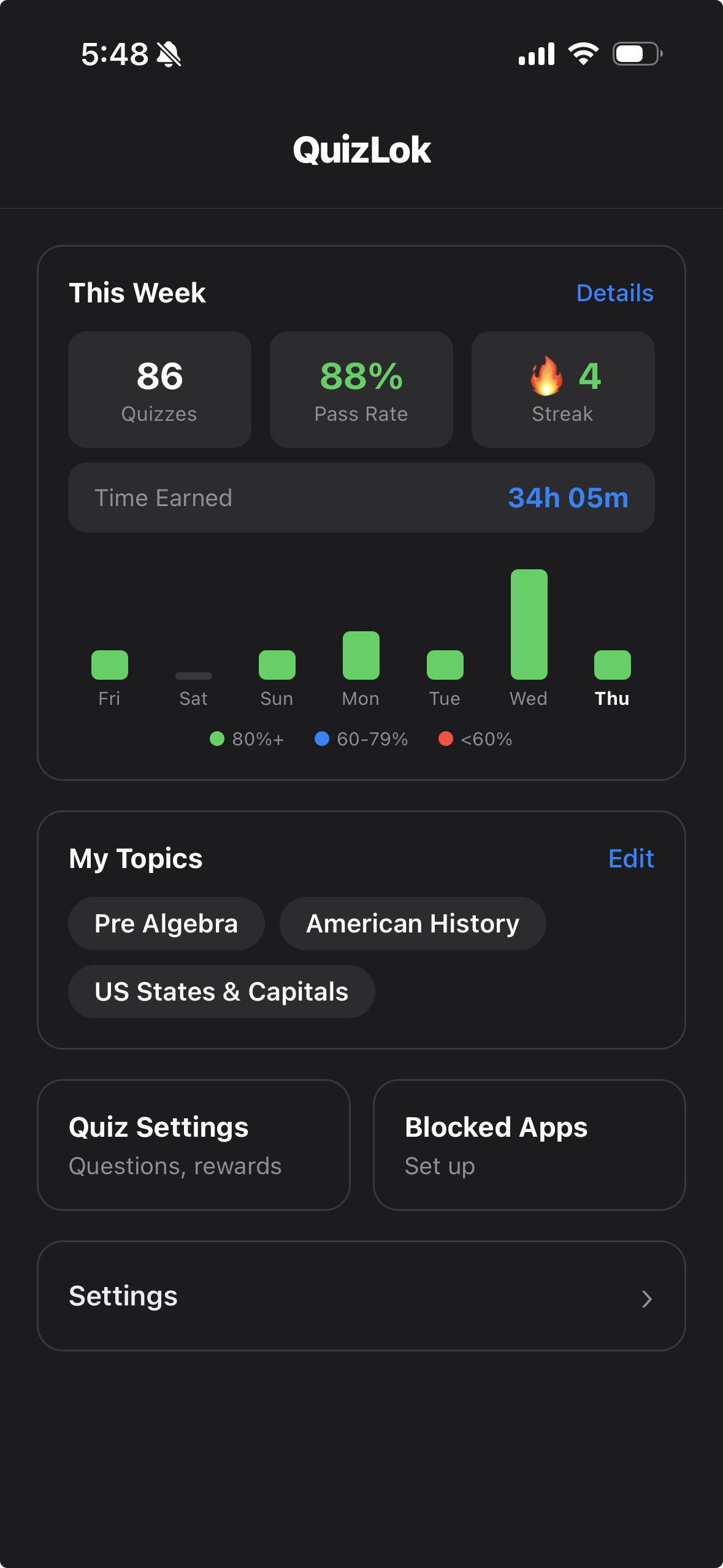
See exactly what your kids are learning, track their progress, and manage quiz settings — all from your device.

📊

Personal Dashboard

See how many questions you've answered, your streak, your topic-by-topic accuracy. All on-device — your study data is yours alone.

📈

Progress Tracking

Weekly report cards show pass rate, accuracy by topic, screen time earned, and streaks. Parents see everything — kids stay accountable even when you're not in the room.

Weekly progress shows pass rate, accuracy by topic, time earned, and streaks. Useful as actual study analytics — see where you're weak, focus there.

⏱️

Flexible Rewards

Customize how much screen time each quiz earns. Set timers, question counts, and difficulty to match your goals.

Tune the friction to your goal. Short, frequent unlocks for serious study days. Longer ones for evenings off. Difficulty pinned to easy/medium/hard or rotating.

Simple Pricing

Start with a free 3-day trial. Cancel anytime.

Monthly

Flexible, cancel anytime

$ 9.99 /month
  • Unlimited quizzes
  • All topics
  • App blocking
  • Progress tracking
  • Bypass-proof setup guide included
  • Weekly parent report cards
Join Waitlist for Launch Pricing

All plans include a 3-day free trial. Cancel anytime before your trial ends.

Family plan with multi-device support and remote parent management is coming soon.

Frequently Asked Questions

QuizLok uses advanced AI to generate unique, grade-appropriate questions on any topic. Every quiz is different — kids can't memorize answers. The AI adapts to create questions that are challenging but fair, covering the topic thoroughly.

QuizLok works for kids of all ages — from elementary school through high school. When you add a topic, you can specify the grade level and the AI will adjust question difficulty accordingly. QuizLok also works great for self-motivated adults — college students prepping for exams, professionals who want to earn their social media time, or anyone who knows they need a system instead of willpower.

QuizLok was built with ADHD brains in mind. Rather than relying on willpower — which doesn't work for most kids with ADHD — QuizLok creates an automatic system. The quiz is a small friction point that interrupts the mindless tap-and-scroll reflex. Many ADHD families find that kids sometimes decide not to open an app at all rather than take the quiz, which is exactly the kind of behavioral shift the app is designed to create.

Absolutely. Parents can add, remove, and manage topics from their dashboard. You can set up topics that align with school curriculum, test prep, or just fun learning. Kids can suggest topics, but parents have final control. In the current version, parents manage everything from the child's device using a secure PIN. Remote management from the parent's own device is coming in a future update.

QuizLok integrates with iOS Screen Time to block selected apps until a quiz is completed. Parents choose which apps to block (like games, social media, etc.). Once the child passes their quiz, those apps unlock for the earned screen time duration.

Not if you follow the setup guide. QuizLok uses iOS Screen Time and Family Controls APIs — the same system Apple built for parental controls. The app walks you through locking down your child's device so they can't delete the app, disable notifications, or work around the system. A parent who completes the setup guide will have a bypass-proof configuration.

They get one free retry immediately. If they fail again, a cooldown timer starts — and it gets longer with each subsequent failure. This prevents random answer spamming and encourages kids to actually review the material. Parents can see all attempts in the weekly report card.

A multi-device family plan with remote parent management is planned for a future release. For now, QuizLok is an Individual subscription that works for both individual users and parent-managed child accounts on a shared device.

Yes — every plan comes with a 3-day free trial. You'll set up your subscription up front (Apple's standard flow), then get full access to every feature for 3 days at no charge. If it's not for you, cancel any time before the trial ends and you won't be billed.

Absolutely. QuizLok has a dedicated Individual mode for adults and teens who want to earn their own screen time. Set your own topics — exam prep, professional development, a language you're learning — and block the apps that eat your time. It's the same earn-it mechanic, just self-directed. No parent account needed.

Ready to make screen time
actually count?

Ready to make your distractions
earn their keep?

Built for families who are done fighting over screen time.

Built for people who are done relying on willpower alone.

Join the Waitlist

Launching June 2026 · Discounted pricing locked in for life for waitlist members